We build Cavyro, so read this the way you’d read any comparison written by a vendor. What we can offer in place of neutrality is specifics: how each tool reaches your LinkedIn account, what it does well, and where it stops. For several teams, one of the other seven is the better buy, and we say which.
Every price and quote below comes from the vendor’s own pricing page or help center, checked on 15 November 2026. Where a vendor’s pages disagree with each other, we say so instead of picking the nicer number.
Two questions that split the category
Does it read your LinkedIn inbox, or only save profiles? Half the tools called “LinkedIn CRM” are profile savers. You open someone’s profile, click a button in a Chrome extension, and the person lands in a list. That’s useful for prospecting. It does nothing for the conversation that follows, which still lives in LinkedIn’s messaging tab, where deals go to be forgotten. If your deals start in DMs, you want a tool that reads and sends messages, and puts each thread on a deal.
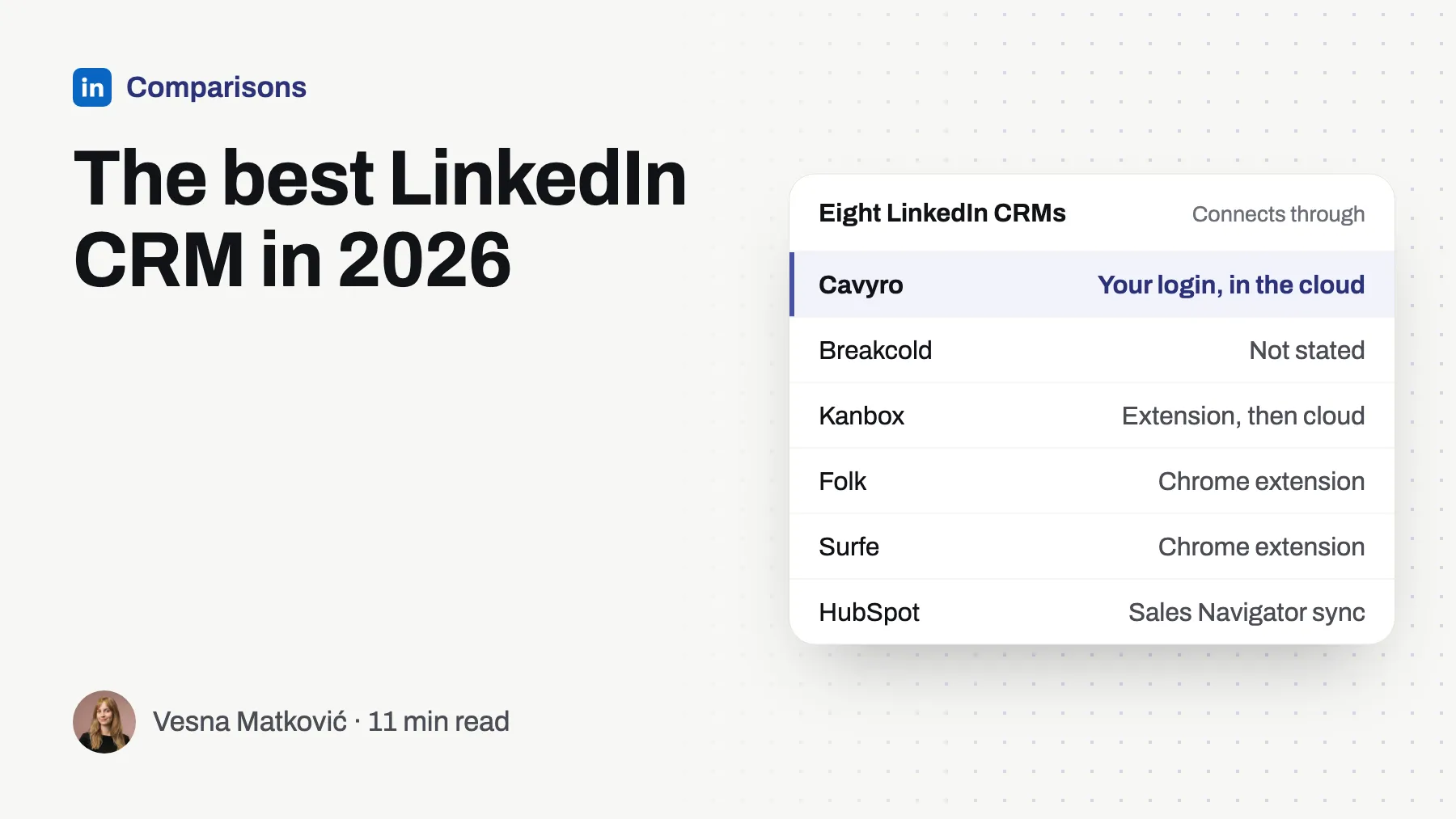
How does it reach your account? Three routes:
- A browser extension runs inside your Chrome while you’re on LinkedIn. It only works while that browser is open.
- A cloud session logs in to LinkedIn on your behalf and keeps working with your laptop shut. This is what lets a tool run an inbox for a whole team.
- LinkedIn’s own Sales Navigator integration syncs some data into a few big CRMs. It’s the only route LinkedIn sanctions, and it’s narrow: no inbox, no messages on the record.
Be clear-eyed about the first two. LinkedIn’s User Agreement, section 8.2, bans “bots or other unauthorized automated methods” to add contacts or send messages, and its help pages name browser extensions that automate activity. Every tool below except HubSpot, Cavyro included, works in territory LinkedIn restricts. The difference between them is how carefully they behave. Ask each vendor for its send limits in numbers; we’ve written down what LinkedIn itself publishes and what happens when an account gets restricted.
Cavyro
Best for: sales teams whose deals start in LinkedIn DMs, often next to WhatsApp, Instagram, Messenger or Telegram, who want a pipeline and not another prospecting tool.
You connect LinkedIn once, with your login and your two-factor code, and Cavyro keeps the session in the cloud. There’s no extension to keep open. Classic messages, Sales Navigator, Recruiter and the company pages you manage each come in as their own inbox, and every chat sits next to its contact and its deal, with stages, values and owners. You can send connection invitations with a 300-character note, and an automation can start when someone accepts: create the deal, assign it, or send the first message after a pause. The same inbox holds the other four chat apps, and behind it sit reports, projects and docs, an AI assistant and a hosted MCP server.
Sending is paced on purpose, per account: 20 invitations a day and 100 a week, 30 new conversations and 100 messages a day, automated sends 20 to 40 seconds apart. If LinkedIn refuses an invitation, invitations from that account pause for a day; if it pushes back on sending, the account stops sending until LinkedIn’s wait is over. Pro is $59 a seat a month ($49 billed annually) with two messaging accounts per seat; an extra account is $10 a month. 5-day trial, no card.
Where it stops: no lead search, no profile scraping and no email finder. Cavyro works on the conversations you have and the people you choose to invite, so if you need lists of thousands of prospects, you need a second tool. Email is Gmail only. No free tier.
Breakcold
Best for: founders and small sales teams who sell across LinkedIn, email, WhatsApp and Telegram, and want AI to handle the CRM admin.
Breakcold says it “connects to LinkedIn through a stable integration designed to keep your account safe, not through a scraper”, with “no Chrome extension to click”; it doesn’t say what that integration is. “LinkedIn DMs, InMails, connection requests and Sales Navigator threads all sync”, and you reply from Breakcold. It has pipelines with deal amounts, an email inbox, call recording, enrichment, and an AI assistant that drafts replies and updates the pipeline. It’s the closest product to Cavyro on this list, and its enrichment and email inbox are things we don’t have.
Where it stops: no Instagram or Messenger inbox (those are lead capture only), no projects or docs, and we didn’t find LinkedIn send limits on its pages. X1 is $49 a seat a month with two connected accounts per seat (X5 $99, X20 $199); extra accounts are $10. The trial is 14 days; its pricing FAQ says it asks for a card, while its LinkedIn page says it doesn’t. We compare the two in detail on Cavyro vs Breakcold.
Kanbox
Best for: solo founders and small teams who live on LinkedIn only and want an inbox with a Kanban board, cheap.
Kanbox links your account through a Chrome extension, then “everything then runs in the cloud”. It has a “Smart LinkedIn Inbox” with synced conversations, Kanban pipelines, tags, automated campaigns and an email finder. Starter is $20 a month ($12 billed annually); Essential is $45 per LinkedIn account a month ($30 annually). 15-day trial, no card.
Where it stops: LinkedIn only. Its pages show Kanban stages but don’t mention a deal value, so it can tell you who’s at which stage, not what the pipeline is worth.
Folk
Best for: founders, investors and agencies who want a clean, shared contact database fed from LinkedIn and email.
Folk is a good-looking, easy CRM, and its folkX extension saves a LinkedIn profile into it in one click. Email, calendar and WhatsApp sync are built in. Standard is $24 a member a month billed yearly ($30 monthly); Premium is $48 ($60). Two-week trial, no card.
Where it stops: Folk says itself that it “does not have a native integration with LinkedIn for automatic syncing”. To keep a conversation, you click the folkX button inside LinkedIn and log the messages as interactions, one thread at a time. Pipelines are on Standard, but “Custom objects & Deals” are Premium only.
Surfe (with Pipedrive, HubSpot or Salesforce)
Best for: teams that already run Pipedrive, HubSpot or Salesforce and want LinkedIn in it without changing CRM.
Surfe is a Chrome extension that puts your CRM next to LinkedIn: add a profile as a contact, sync LinkedIn messages to the record, find emails and phone numbers. Pipedrive has no native LinkedIn integration, and Surfe is the LinkedIn app in its marketplace. Surfe has a free plan limited to adding one contact a day; Essential is $49 a user a month ($39 annually), Pro $89 ($79). Then you pay the CRM: Pipedrive starts at $14 a seat a month billed annually, with a 14-day trial and no card.
Where it stops: there’s no inbox of its own. Messages sync into your CRM, and you still reply on LinkedIn, in the browser where the extension runs. Two subscriptions instead of one.
HubSpot
Best for: companies already on HubSpot Sales Hub Professional that pay for Sales Navigator Advanced Plus.
HubSpot’s LinkedIn link is LinkedIn’s own Sales Navigator integration, the one route on this list LinkedIn fully sanctions. It shows Sales Navigator details on HubSpot records and lets you send an InMail from a record. Everything else HubSpot does, deals, sequences, reporting, comes with it.
Where it stops: it needs “a LinkedIn Sales Navigator Advanced Plus account” and “an assigned Sales Hub Professional or Enterprise seat”. It is “not possible to import contacts from LinkedIn using the integration”, and an InMail sent from a record “will not automatically save to the record’s timeline”. There’s no LinkedIn inbox; sequences create LinkedIn tasks for you to do by hand. Sales Hub Professional is $90 to $100 a seat a month plus a $1,500 onboarding fee, before the Sales Navigator licence.
Waalaxy
Best for: people starting LinkedIn outreach on a small budget who mostly need invitation and message campaigns.
Waalaxy is “now 100% cloud: campaigns run on Waalaxy’s servers”, with a Chrome extension as one way in. It’s built around prospecting sequences: invitations, follow-up messages, and on higher plans email. Pro starts at €19 a user a month with 300 invitations a month; its page didn’t say whether that’s billed monthly or yearly. 14-day trial.
Where it stops: it isn’t a CRM. There’s no deal pipeline; it syncs prospects to your CRM instead. Its LinkedIn inbox is a paid add-on, €20 a month, and works “directly inside LinkedIn”.
lemlist
Best for: outbound teams running email and LinkedIn sequences at volume.
lemlist runs multichannel sequences, email, LinkedIn, calls, SMS and WhatsApp as an add-on, with a unified inbox where you can reply by “email or LinkedIn”. Its LinkedIn steps “depend on the correct browser session (cookies + the Chrome extension)”, and each lemlist account connects one LinkedIn account. The Multichannel plan, which includes LinkedIn, is $109 a user a month ($87 billed yearly). 14-day trial, no card.
Where it stops: it’s an outreach tool, not a CRM. There’s no deal pipeline; it hands leads to HubSpot, Salesforce or Pipedrive.
The short version
| Tool | How it reaches LinkedIn | LinkedIn inbox | Deals with values | Starting price (Nov 2026) |
|---|---|---|---|---|
| Cavyro | Your login, cloud session | Yes, incl. Sales Navigator and Recruiter | Yes | $59/seat/mo ($49 annual) |
| Breakcold | Not stated | Yes | Yes | $49/seat/mo, card for trial per its FAQ |
| Kanbox | Extension, then cloud | Yes | Stages, no value stated | $20/mo ($12 annual) |
| Folk | Chrome extension | No, manual logging | Premium only | $30/member/mo ($24 annual) |
| Surfe + your CRM | Chrome extension | No, syncs to CRM | In your CRM | $49/user/mo ($39 annual) + CRM |
| HubSpot | Sales Navigator integration | No | Yes | $90–100/seat + $1,500 onboarding + Sales Navigator |
| Waalaxy | Cloud | Paid add-on | No | €19/user/mo |
| lemlist | Browser session + extension | Yes | No | $109/user/mo ($87 annual) |
How to choose in a minute
- Your deals start in LinkedIn DMs and you want a pipeline: Cavyro or Breakcold. Pick Cavyro if WhatsApp, Instagram or Messenger matter too, or you want published send limits; Breakcold if enrichment, calls, or email outside Gmail matter more.
- LinkedIn is your only channel and the budget is tight: Kanbox.
- You want a tidy contact database, not an inbox: Folk.
- You’re keeping Pipedrive, HubSpot or Salesforce: Surfe.
- You run outbound sequences at volume: lemlist or Waalaxy, next to a CRM.
Whatever you pick, ask the vendor two things before you connect your account: how it connects, and what it does when LinkedIn pushes back. A tool that can’t answer the second with numbers is asking you to find out the hard way.
FAQ
What is the best LinkedIn CRM?
It depends on where your deals happen. If they start in LinkedIn DMs, a CRM that reads your inbox and puts each thread on a deal, such as Cavyro or Breakcold. If you mostly save profiles into a database, Folk. If you’re keeping Pipedrive, HubSpot or Salesforce, Surfe.
Does LinkedIn have a built-in CRM?
No. Sales Navigator lets you save leads and accounts into lists and syncs with a few CRMs, but it has no deal pipeline. LinkedIn’s official CRM integrations, such as HubSpot’s, don’t bring your messages into the CRM.
Can a CRM sync LinkedIn messages?
Some can. Cavyro, Breakcold, Kanbox and lemlist read and send LinkedIn messages from their own inbox. Surfe syncs messages into your existing CRM. Folk logs them one thread at a time, and HubSpot’s Sales Navigator integration doesn’t save them at all.
Are LinkedIn CRMs safe for my account?
None is risk-free. LinkedIn’s User Agreement bans unauthorized automation, and only its own Sales Navigator integrations are sanctioned. Tools that keep to low daily limits, space out sends and stop when LinkedIn pushes back lower the risk. Ask each vendor for its limits in numbers.
Is there a free LinkedIn CRM?
Not one that covers a team with a pipeline. Surfe has a free plan limited to adding one contact a day. Every tool here has a free trial, from 5 to 15 days; Breakcold’s pricing page says its trial asks for a card.