We build Cavyro, so read this the way you’d read any comparison written by a vendor. What we can offer in place of neutrality is specifics: how each tool connects to WhatsApp, what it does well, and where it stops. For several teams, one of the other eight is the better buy, and we say which.
Every price and quote below comes from the vendor’s own pricing page or help center, checked on 15 November 2026. Prices move, and two of these tools now price by region, so treat the numbers as a starting point.
How we picked and ordered the nine
A tool made the list if it sells itself as a WhatsApp CRM or WhatsApp inbox and publishes a price. We left out general CRMs where WhatsApp is one channel among many add-ons, such as Zoho CRM and Pipedrive. If you already run one of those, try its WhatsApp integration before you buy anything else.
The order follows what a sales team needs from WhatsApp, heaviest check first:
- It connects the number your customers already message.
- Deals carry a stage and a value, inside the tool.
- You can pay monthly, and Meta’s per-message fees don’t apply.
So the four tools that connect your own number come first, then Kommo, which offers both routes, then the API tools, and HubSpot last because it needs a plan most small teams don’t have. Cavyro goes first because it’s ours. On these checks alone, Breakcold ties with us and costs less per seat. If you send broadcasts to opted-in lists, read the list from the bottom up.
The question that splits the category
Almost every difference between these products comes from one choice: does the tool connect through the WhatsApp Business API, or does it connect the WhatsApp you already use on your phone?
The Business API (Meta also calls it the Cloud API) is built for companies messaging customers at scale. Messages you start must use templates Meta approves, free-form replies are only allowed within 24 hours of the customer’s last message, and Meta charges per template message. In return you get broadcasts to opted-in lists, chatbots and many agents on one number. A number on the API traditionally couldn’t stay on the phone app at all. Several vendors now offer coexistence, which keeps the WhatsApp Business app working on the same number, though only in some countries and only for the Business app.
Your own number connects the way WhatsApp Web does: scan a QR code under Linked devices and the tool sees what your phone sees. No templates, no 24-hour window, no Meta fees, and the customer keeps talking to the same person in the same chat. The trade-off is that WhatsApp’s anti-spam rules apply to you as a person, so the tool has to pace what it sends. We covered what happens when it doesn’t in WhatsApp account banned.
Rule of thumb: support desks and marketing teams messaging thousands of opted-in customers want the API. Salespeople whose deals already live in their WhatsApp want their own number.
Two more questions to settle before any demo:
Inbox or pipeline? Several tools below resolve conversations well and have no deal with an amount on it. If nothing has a stage and a value, the tool can’t tell you what your pipeline is worth.
How does it bill? Per seat, per contact, or a flat price with a user bundle. That decides your cost in month twelve more than the sticker does.
Cavyro
Best for: sales teams whose deals happen in WhatsApp chats, often next to Instagram, LinkedIn, Messenger or Telegram, who want a pipeline and not a tidier inbox.
Cavyro connects the WhatsApp or WhatsApp Business app you already use, as one more linked device, with a QR or pairing code. Nothing goes through the Business API, so there are no templates to approve and no per-message fees from Meta. Every chat sits next to its contact and its deal, with stages, values and owners, and the same inbox holds the other four chat apps. Behind it: automations, campaigns that only go into chats you already have (A/B tests, drips that stop on reply, revenue attribution), reports, projects and docs, an AI assistant and a hosted MCP server.
Sending is paced on purpose. A newly connected WhatsApp account starts no new conversations for 24 hours, then at most 10 a day, and automated messages go out 15 to 25 seconds apart. Pro is $59 a seat a month ($49 billed annually) with two messaging accounts per seat; an extra account is $10 a month. 5-day trial, no card.
Where it stops: no Business API, so no broadcasts to thousands of opted-in customers, no chatbot flows and no template messages. Email is Gmail only, and there’s no contact enrichment. No free tier.
Breakcold
Best for: founders and sales teams who sell across LinkedIn, WhatsApp, Telegram and email, and want AI to handle the CRM admin.
Breakcold says most of its customers “connect their main WhatsApp number, the one they already use with prospects”, and you can reply from Breakcold or from the WhatsApp app. It has unlimited pipelines with deal amounts, an email inbox, call recording, unlimited enrichment, and an AI “Chief of Staff” that drafts replies and updates the pipeline. It’s the closest product to Cavyro on this list, and its enrichment and email inbox are things we don’t have.
Where it stops: no Instagram or Messenger, no projects or docs for delivering what you sold, and its pages don’t describe campaigns or publish send limits. X1 is $49 a seat a month with two connected accounts per seat (X5 $99, X20 $199, the tiers differ in AI allowance); extra accounts are $10. The 14-day trial asks for a card. We compare the two in detail on Cavyro vs Breakcold.
TimelinesAI
Best for: teams that already run HubSpot, Pipedrive or Salesforce and want their WhatsApp chats inside it.
TimelinesAI connects a number “by QR code, through Meta’s official WhatsApp Business API, or both at once with Coexistence”, and works with the personal and Business apps. Its job is syncing: chats land on contacts and deals in the CRM you already pay for. Starter is $35 a seat a month ($28 billed yearly), with 50 bulk-message credits per seat; Meta’s template fees are the only extra. 10-day trial, no card.
Where it stops: it’s WhatsApp only, and it has no pipeline of its own. The CRM is somebody else’s product, so you’re paying for two.
Periskope
Best for: teams that run WhatsApp groups and communities.
Periskope connects by linked device only, and says plainly that “WhatsApp API numbers cannot be linked”. It’s “purpose built for WhatsApp group and community management”, with ticketing, bulk messages to groups and chats (3,000 credits per user a month) and HubSpot and Zoho integrations. Starter is $25 per user a month, with the first phone free and $25 for each extra one. 7-day trial, extendable to 14.
Where it stops: WhatsApp only, and no sales pipeline. Deals live in whichever CRM you connect it to.
Kommo
Best for: small sales teams that want a messenger CRM with an official WhatsApp integration and don’t mind a six-month commitment.
Kommo offers both routes. Its main WhatsApp integration runs on the Business API, and it can keep your WhatsApp Business app on the same number through coexistence. There’s also “WhatsApp Lite” for personal accounts, which Kommo says “doesn’t support broadcasts, message templates, automations, or multi-user access”. Pipelines have real values, and Instagram, Facebook, TikTok and Telegram sit next to WhatsApp.
Where it stops: “Monthly payment is not currently available. The minimum subscription period is 6 months.” Base is $25 a user a month, billed $150 per user for six months, and broadcasts start on Advanced ($35). Prices for new users vary by region since September 2026. 14-day trial, no card. We wrote a longer piece on Kommo alternatives, from the Telegram side.
respond.io
Best for: B2C companies with a lot of inbound WhatsApp leads and an agent team to answer them.
respond.io is an official WhatsApp partner and works on the API only: “A phone number for WhatsApp Business API cannot be used in any WhatsApp Personal or Business App”, unless you use coexistence. It does routing, assignment, workflows, AI agents and lifecycle stages well, across Messenger, Instagram, TikTok, Telegram (as a bot), LINE, WeChat, Viber, SMS and email.
Where it stops: lifecycle stages, but deal values aren’t described on its pages. Starter is $79 a month billed yearly ($99 monthly) for 5 users, extra users $12 to $15, and broadcasts start on Growth ($159 yearly). Meta’s fees are billed on top, without a markup. 7-day trial, no card. Our respond.io alternatives post covers it in depth.
WATI
Best for: marketing and support teams running WhatsApp broadcasts and chatbots.
WATI is built on the Business API, with coexistence for the Business app; without it, an existing number has to be deleted from WhatsApp first. The Growth plan includes 15,000 broadcasts a month, a team inbox, chatbots and a visual sales pipeline, plus Instagram, Facebook, TikTok and SMS.
Where it stops: the pipeline exists, but its pages don’t mention deal values. Growth was €59 a month billed annually (€69 monthly) for 3 users when we checked; WATI shows prices in your local currency, so yours may differ. Template messages are charged on top. 7-day trial, no card.
SleekFlow
Best for: customer-facing teams in Asia and the Middle East that want AI agents across many channels.
SleekFlow is a WhatsApp Business Solution Provider on the Cloud API, with coexistence in selected countries. It covers Instagram, Messenger, Telegram, LINE, WeChat, Viber, TikTok, SMS and email, and its CRM tracks deal value in a Kanban view.
Where it stops: broadcasts and AI agents aren’t on the entry plan. Essential is US$49 a month billed yearly, with 3 seats and 500 monthly active contacts, plus a US$15 monthly number-hosting fee and conversation charges per SleekFlow’s rate card. Pro is US$109. 7-day trial, no card.
HubSpot
Best for: companies already on HubSpot Professional that want WhatsApp in the shared inbox.
HubSpot connects a WhatsApp Business account, through coexistence by scanning a QR code in the Business app. The upside is everything else HubSpot does: deals, sequences, reporting, the whole platform.
Where it stops: WhatsApp needs Service Hub or Marketing Hub Professional or higher; Sales Hub and Starter don’t qualify. The cheapest route is Service Hub Professional at $90 to $100 a seat a month plus a $1,500 onboarding fee, and WhatsApp is capped at 1,000 template messages a month. Personal WhatsApp can’t be connected.
The short version
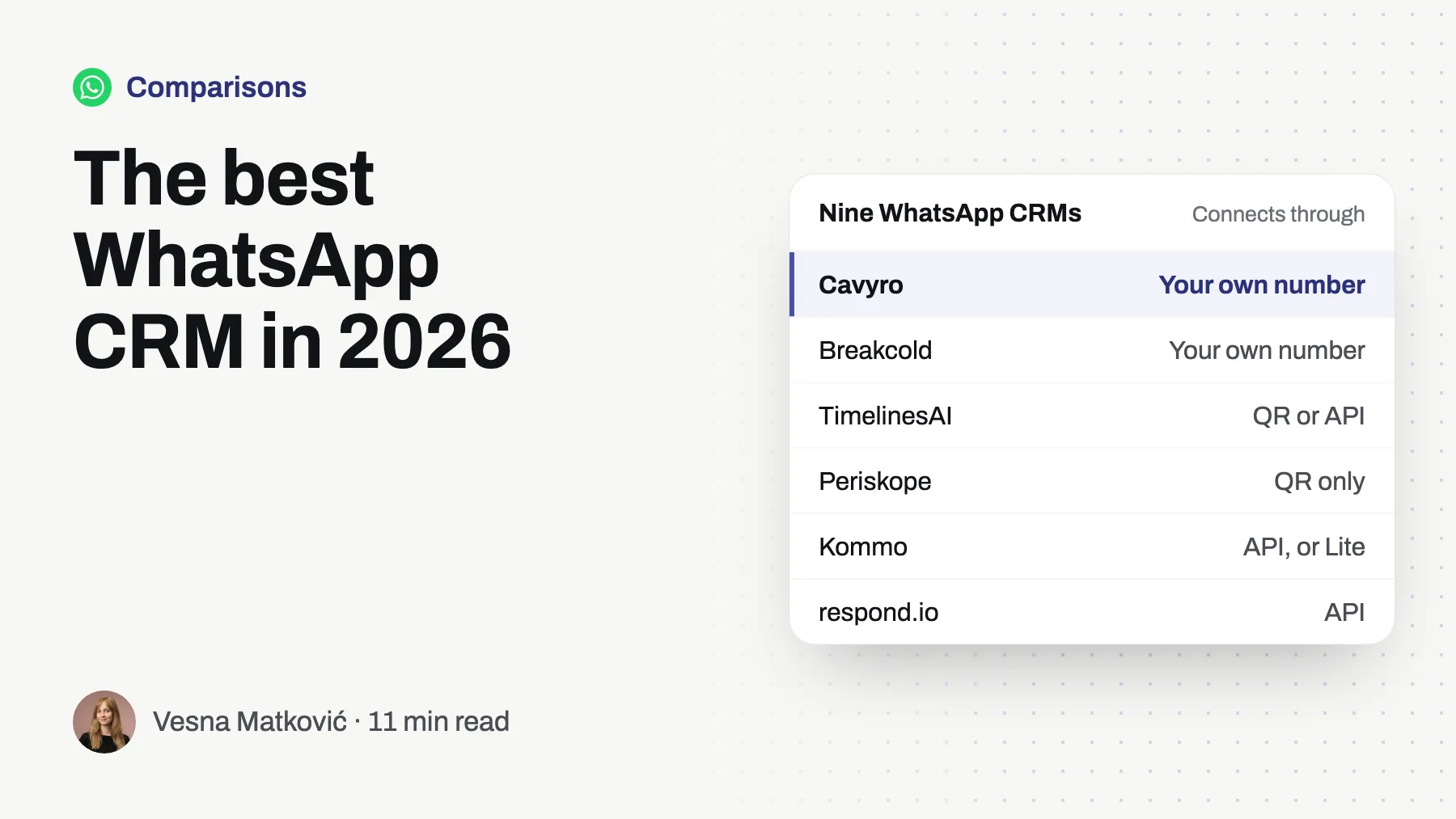
| Tool | WhatsApp connection | Deals with values | Starting price (Nov 2026) | Best for |
|---|---|---|---|---|
| Cavyro | Your own number (linked device) | Yes | $59/seat/mo ($49 annual) | Sales in WhatsApp plus 4 other chat apps |
| Breakcold | Your own number | Yes | $49/seat/mo, card for trial | Sales across LinkedIn, WhatsApp, email |
| TimelinesAI | QR, API or both | In your CRM | $35/seat/mo ($28 annual) | Syncing WhatsApp into HubSpot or Pipedrive |
| Periskope | QR only | No | $25/user/mo | WhatsApp groups and communities |
| Kommo | API, coexistence or Lite | Yes | $25/user/mo, 6-month minimum | Messenger CRM for small teams |
| respond.io | API (plus coexistence) | Stages only | $79/mo yearly, 5 users | High-volume inbound, B2C |
| WATI | API (plus coexistence) | Not stated | €59/mo yearly, 3 users | Broadcasts and chatbots |
| SleekFlow | API (plus coexistence) | Yes | $49/mo yearly, 3 seats | Multichannel support with AI agents |
| HubSpot | Business account, coexistence | Yes | $90–100/seat + $1,500 onboarding | Teams already on HubSpot Pro |
What three seats cost a month
Sticker prices hide the billing model, so here’s the same nine for a team of three, on the entry plan that includes WhatsApp, from the prices above. Paying yearly is cheaper for most of them.
| Tool | Three seats, per month | On top |
|---|---|---|
| Cavyro | $177 monthly, $147 yearly | Nothing from Meta |
| Breakcold | $147 | Nothing from Meta |
| TimelinesAI | $105 monthly, $84 yearly | Meta fees only if you add the API |
| Periskope | $75, first phone included | $25 per extra phone |
| Kommo | $75, paid as $450 every six months | Meta fees on the API route |
| respond.io | $99 monthly, $79 yearly, up to 5 users | Meta fees |
| WATI | €69 monthly, €59 yearly | Template messages |
| SleekFlow | $64 yearly ($49 plus $15 number hosting) | Conversation charges |
| HubSpot | $270 to $300 | $1,500 onboarding, once |
The API tools look cheap per user because the plan bundles seats, then Meta bills every template message you start. The own-number tools cost more per seat and nothing per message. If your team mostly replies to people who wrote first, the per-seat price is close to the whole bill.
How to choose in a minute
- Your deals already live in your team’s WhatsApp, and you want a pipeline: Cavyro or Breakcold. Pick Cavyro if Instagram or Messenger matter, or you want projects and warm campaigns; Breakcold if enrichment, calls, or email outside Gmail matter more.
- You love your current CRM and only need the chats in it: TimelinesAI.
- You run groups and communities: Periskope.
- You send to thousands of opted-in customers, with templates and chatbots: WATI, respond.io or SleekFlow, on the API.
- You’re on HubSpot Professional already: use its WhatsApp channel before adding a tool.
Whatever you pick, ask the vendor two things before you connect a number: how it connects (API or linked device), and what it does to keep that number safe. A tool that can’t answer the second one with numbers is asking you to find out the hard way.
FAQ
What is the best WhatsApp CRM?
It depends on how you use WhatsApp. For sales teams whose deals live in their own WhatsApp chats, a CRM that connects your number with a pipeline behind it, such as Cavyro or Breakcold. For broadcasts and support at volume, an API tool such as WATI, respond.io or SleekFlow.
Can I use a CRM with my personal WhatsApp number?
Yes. Tools like Cavyro, Breakcold, TimelinesAI and Periskope connect your personal or Business app as a linked device, the way WhatsApp Web does. API-only tools need a Business API number, though coexistence now lets some keep the WhatsApp Business app on the same number.
Do I need the WhatsApp Business API for a CRM?
Not for one-to-one sales. The API is built for templates, broadcasts to opted-in customers and chatbots, and Meta charges per template message. If your team talks to customers one by one, a CRM that connects your existing number avoids templates and fees.
Is WhatsApp Business a CRM?
No. The WhatsApp Business app gives you labels, quick replies, a catalog and away messages for one phone. There’s no deal with a value, no pipeline and no report of what your chats are worth. A WhatsApp CRM connects that app, or the API, to contacts and deals your whole team can see.
How much does a WhatsApp CRM cost?
For a team of three, roughly $75 to $300 a month on entry plans in November 2026. Own-number tools charge per seat and nothing per message. Business API tools bundle seats into a plan, then Meta charges for every template message you start, which grows with volume.
Can several people use one WhatsApp number in a CRM?
Yes. API tools put one number in a shared team inbox. Own-number tools connect it as a linked device: in Cavyro, whoever connects the account can share it with teammates to read or to read and send, and can still hide single chats from the team.
Is there a free WhatsApp CRM?
None of the nine has a free plan that covers a team with a pipeline. Kommo’s WhatsApp Lite connects a personal account at no extra cost inside a paid Kommo plan. Every tool here has a free trial, from 5 to 14 days; Breakcold’s asks for a card.
Does HubSpot work with WhatsApp?
Yes, on Service Hub or Marketing Hub Professional and above, through a WhatsApp Business account. It doesn’t connect personal WhatsApp, caps template messages at 1,000 a month, and Professional plans carry an onboarding fee.